
Step-by-Step Guide to Configure DNS Forward and Reverse Lookup Zones on Windows Server
To set up a DNS server, configuring DNS Forward and Reverse Lookup Zones is essential. The Forward Lookup Zone converts domain names into IP addresses, while the Reverse Lookup Zone does the opposite, converting IP addresses back into domain names, dedicated hosting. Below is a step-by-step guide on how to configure both zones on a Windows Server and VPS .
Understanding Forward and Reverse Lookup Zones
A Forward Lookup Zone acts like a directory for computing systems, helping to transform domain names (e.g., “example.com”) into IP addresses by using A (Address) records. This capability is crucial for web browsing as devices utilize IP addresses to communicate, dedicated server..
Conversely, a Reverse Lookup Zone allows users to find a hostname by using an IP address, similar to searching for a person’s name using their phone number. Dedicated Server Hosting – This function is facilitated through PTR (Pointer) records, allowing for IP tracing and accurate device recognition on a network.
Before creating these zones, organizations should review their requirements, including naming conventions and IP address selections to comply with internal policies, dedicated servers.
Configuring Forward Lookup Zone
Colocation, To create a Forward Lookup Zone, follow these steps:
- Open Server Manager and navigate to Tools > DNS.
- Right-click on your server, then select New Zone.
- Click Next in the wizard that appears.
- Choose Primary zone and click Next.
- Select the Forward Lookup Zone option, then click Next.
- Enter a Zone name and click Next.
- Check the option Create a new file with this file name, input a file name, and click Next. The filename should have a “.dns” extension.
- Select an option on the Dynamic updates page and click Next.
- Review the summary and click Finish.
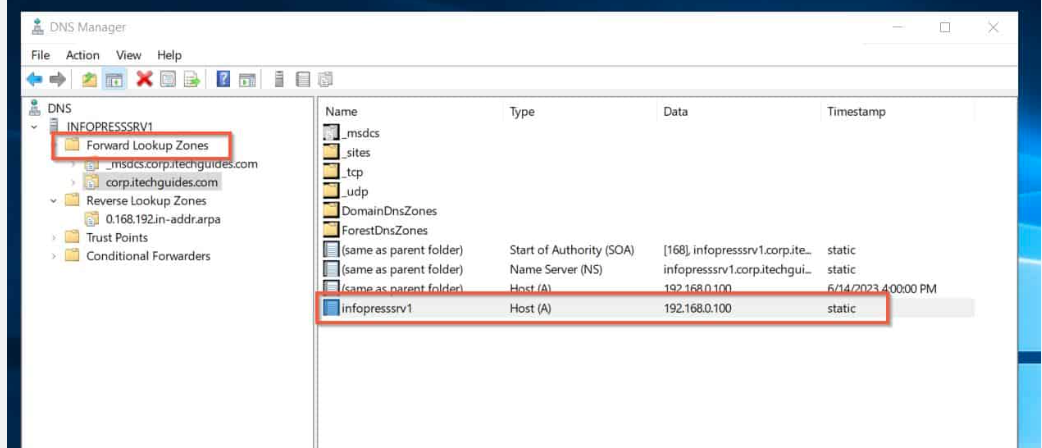
You can verify the new zone by expanding the Forward Lookup Zones to see the recently created zone. Also check, bare metal dedicated servers!
Configuring Reverse Lookup Zone
For the Reverse Lookup Zone, ensure to specify whether it is a Primary Zone. Both Forward and Reverse Lookup Zones can be configured as Primary Zones on the same server. To set up a Reverse Lookup Zone:
- Open the DNS wizard from Server Manager.
- Right-click on your server name and select New Zone.
- Click Next to proceed.
- Choose Primary zone (if there is no compliance) and click Next.
- Select Reverse lookup zone and click Next.
- Choose either the IPv4 Reverse Lookup Zone or IPv6 Reverse Lookup Zone based on your network, which may require creating both if both IP protocols are in use.
- Specify the Network ID or Reverse lookup zone name and click Next.
- Enter the zone name and click Next.
- Choose the dynamic update schedule and click Next.
- Finally, complete the setup by clicking Finish.
You can check the newly created zone under the Reverse Lookup Zones section.
If you wish to perform a reverse DNS lookup using Windows, you can use the nslookup command. Open the Command Prompt and run nslookup (replace with the actual IP). This command will return the hostname associated with that IP address.
Frequently Asked Questions
What is DNS and why is it important?
DNS (Domain Name System) translates human-readable domain names into IP addresses so devices can communicate over a network. It is essential for website access, email delivery, and internal network operations.
What is a forward lookup zone in DNS?
A forward lookup zone in DNS maps domain names to IP addresses. When users enter a website name, the DNS server uses the forward lookup zone to return the correct IP address.
What is a reverse lookup zone in DNS?
A reverse lookup zone does the opposite of a forward lookup zone. It maps IP addresses back to domain names, which is commonly used for server verification, logging, and email authentication.
What is the difference between forward lookup zone vs reverse lookup zone?
The main difference in forward lookup zone vs reverse lookup zone is direction. Forward lookup resolves domain names to IP addresses, while reverse lookup resolves IP addresses back to domain names.
Why do I need both forward and reverse lookup zones?
Using both lookup zones ensures proper DNS resolution, improves network reliability, and supports services like email servers and security audits that rely on reverse DNS verification.
How do I configure a forward lookup zone in DNS?
To configure a forward lookup zone, you create a zone for your domain, add A or AAAA records, and define name-to-IP mappings. This allows DNS to resolve domain names correctly.
How do I configure a reverse lookup zone in DNS?
A reverse lookup zone is configured by creating a zone for the IP address range and adding PTR records. These records map IP addresses back to domain names for reverse DNS lookups.
Can DNS work without a reverse lookup zone?
Yes, basic DNS resolution works without reverse lookup zones. However, many enterprise services, email servers, and security systems require reverse DNS to function properly.
What are common issues when configuring DNS forward and reverse zones?
Common issues include incorrect zone configuration, missing PTR records, mismatched IP ranges, and firewall restrictions blocking DNS traffic.
When should I use forward lookup zone vs reverse lookup zone?
Use a forward lookup zone when resolving domain names to IP addresses and a reverse lookup zone when validating IP-to-domain mappings. Understanding forward lookup zone vs reverse lookup zone helps maintain accurate and secure DNS configurations.
ColoCrossing excels in providing enterprise Colocation Services, Dedicated Servers, VPS, and a variety of Managed Solutions, operating from 10 data center locations nationwide. We cater to the diverse needs of businesses of any size, offering tailored solutions for your unique requirements. With our unwavering commitment to reliability, security, and performance, we ensure a seamless hosting experience.
For Inquiries or to receive a personalized quote, please reach out to us through our contact form here or email us at sales@colocrossing.com.

